How to Display Clickable Record Names in Flow Data Table : Yumi Ibrahimzade
by: Yumi Ibrahimzade
blow post content copied from Salesforce Time
click here to view original post
**Summary of Salesforce Flow Data Table Component** The Data Table component in Salesforce Flow is a useful tool for showing records in a clear, interactive way. It allows users to view and select records during a screen flow, making it popular among administrators who want to enhance user experiences. However, there are some drawbacks: the names of records are not clickable, and lookup fields show record IDs instead of user-friendly names. To improve this, you can create formula fields that make record names and lookup fields clickable. By using simple formulas, you can transform standard fields like Case Number and Account IDs into clickable links that open the respective records. **Steps to Create Clickable Fields:** 1. **Formula for Case Number:** Use this formula to make the Case Number clickable: `HYPERLINK("/"&Id, CaseNumber)` 2. **Formula for Lookup Field:** To make an Account lookup field display a clickable name, use this formula: `HYPERLINK("/"&AccountId, Account.Name)` 3. **Opening in Same Tab:** If you want the records to open in the same tab, add a target attribute to the formulas: `HYPERLINK("/"&Id, CaseNumber, "_self")` `HYPERLINK("/"&AccountId, Account.Name, "_self")` By implementing these formula fields, you can enhance the user experience in the Salesforce Flow Data Table. **Additional Context:** Salesforce Flow is a powerful automation tool within the Salesforce ecosystem that allows users to create custom workflows. The Data Table component is particularly beneficial when displaying lists of records, and enhancing its functionality with clickable links can make the interface much more user-friendly. **SEO Hashtags:** #Salesforce #SalesforceFlow #DataTable #SalesforceAdmin #UserExperience #ClickToOpen #FormulaFields #CRMTools #SalesforceTips
The Data Table component in Salesforce Flow is a powerful way to display records in a structured and interactive format. It allows users to view and even select records directly within a screen flow, making it a go to choice for admins building dynamic user experiences. However, it comes with a few limitations. The name fields aren’t clickable, and lookup fields show the record IDs instead of the related record names, which doesn’t look great for end users. This post explains how to display clickable record names and lookup fields in Salesforce Flow Data Table.
Standard Behavior
Before jumping into the solution, let’s see how record names and lookup fields appear in the Data Table component.
Here’s a screen flow that displays open Case records in a Data Table. As you can see, the Case Number is not clickable. Moreover, the Account lookup field displays record IDs instead of record names.
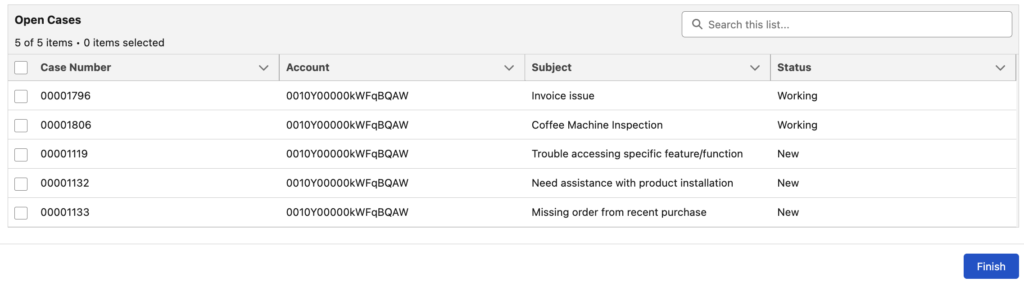
Although this is the default behavior of the Data Table element, you can still display clickable record names and lookup fields using a simple formula field.
Using Formula Fields to Display Clickable Record Names in Flow Data Table
To display clickable record names and lookup fields in a Data Table, create a simple formula field on the object. This formula field should contain the link to the record you want to open. Since it’s used inside Salesforce and not externally (for example, in an email body), you can build the formula in this format: /Id
Here is a simple hyperlink formula that makes the Case Number clickable.
HYPERLINK("/"&Id, CaseNumber)You can replace "CaseNumber" with any field you want. In most cases, you will want to use "Name" instead.
You can create another formula field to make the lookup field display a clickable record name. It’s very similar to the previous formula. This one links to the Account record and displays the Account name.
HYPERLINK("/"&AccountId, Account.Name)After creating these formula fields, simply replace the standard CaseNumber and AccountId fields in your Data Table.
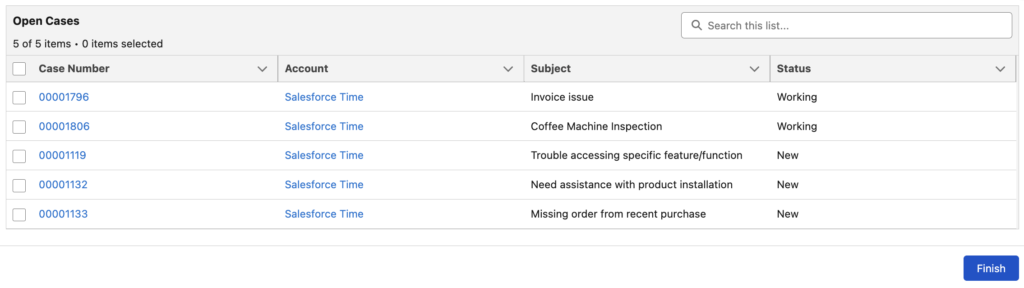
When you click them, the Case or Account record opens in a new tab. If you want to open them in the same tab, add a target attribute to the formula fields.
Here are the formulas that you can use to open the records in the same tab:
HYPERLINK("/"&Id, CaseNumber, "_self")HYPERLINK("/"&AccountId, Account.Name, "_self")The post How to Display Clickable Record Names in Flow Data Table appeared first on Salesforce Time.
October 08, 2025 at 03:47PM
Click here for more details...
=============================
The original post is available in Salesforce Time by Yumi Ibrahimzade
this post has been published as it is through automation. Automation script brings all the top bloggers post under a single umbrella.
The purpose of this blog, Follow the top Salesforce bloggers and collect all blogs in a single place through automation.
============================

Post a Comment